







October 23, 2026
Ever wonder why businesses need financial models? You can simply picture financial models as a GPS system for a business. This means financial models guide businesses to reach their destination.
In absence of them, a company is like driving a car without headlights at night.
According to the 2025 AFP FP&A Benchmarking Survey, 96% of respondents use spreadsheets for financial planning, highlighting Excel's important role in business finance.
Every business has financial questions to answer, from how much it can earn next year to whether a new investment makes sense.
Different financial models help address these questions, but building them manually can require considerable time and effort.
AI-powered Excel add-ins offer a more efficient way to work with financial data. Let's explore the types of financial models you can build using these tools.
Types of Financial Models You Can Build Using AI-Powered Excel Add-ins
Every financial model is generated to serve a unique business goal, whether it is budget planning, valuation analysis, or capital management. Let's discuss types of financial models you can create using AI-powered Excel add-ins.
Financial Forecasting Models
The financial forecasting model evaluates a company's revenue, expenses, liquidity, and profitability within Excel sheets. It can understand plain English prompts and can also run advanced algorithms to generate a fully connected spreadsheet structure.
You don't need to generate complex formulas; instead, just command the model in plain English (e.g., Calculate the upcoming year's operating expenses by assuming a 5% annual cost increase).
AI can create connected Income Statements, Balance Sheets, and Cash Flow Statements through past data without spending days.
AI can extract useful data from external platforms, maintain the historical data, and pull the updated information from project management, CRM, or other business platforms.
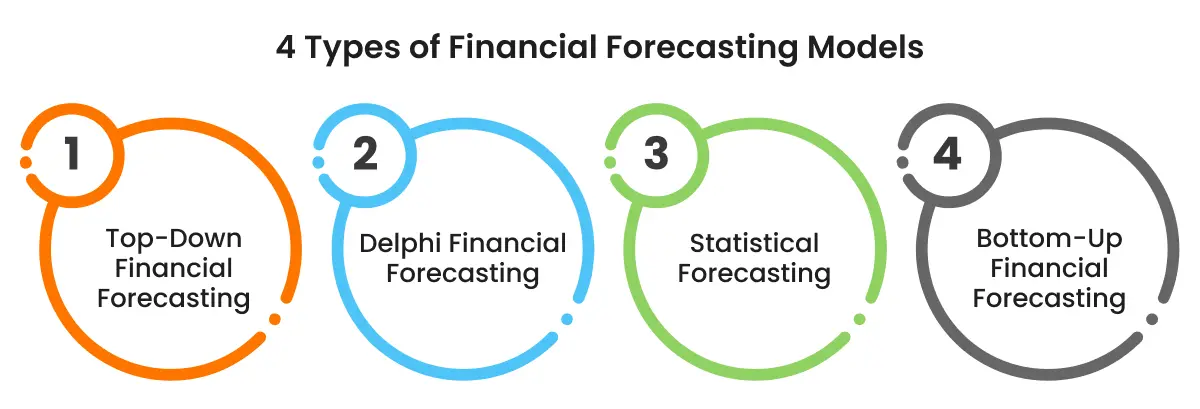
Build feature-rich to improve organization and team efficiency OneNote add-ins.
Budgeting and Planning Models
A budgeting and planning model helps businesses estimate their expected income and expenses over a specific period, such as a month, quarter, or year. It allows businesses to allocate funds, plan future spending, and compare actual results with their budgets.
AI-powered Excel add-ins can analyze historical financial data, generate formulas, and automate budget calculations.
Besides this, it is also known for:
-
Estimating future income and expenses
-
Comparing actual spending with planned budget
-
Planning future spending
-
Allocating budget
It can also highlight budget differences and analyze how changes in revenue or costs may affect the overall budget.
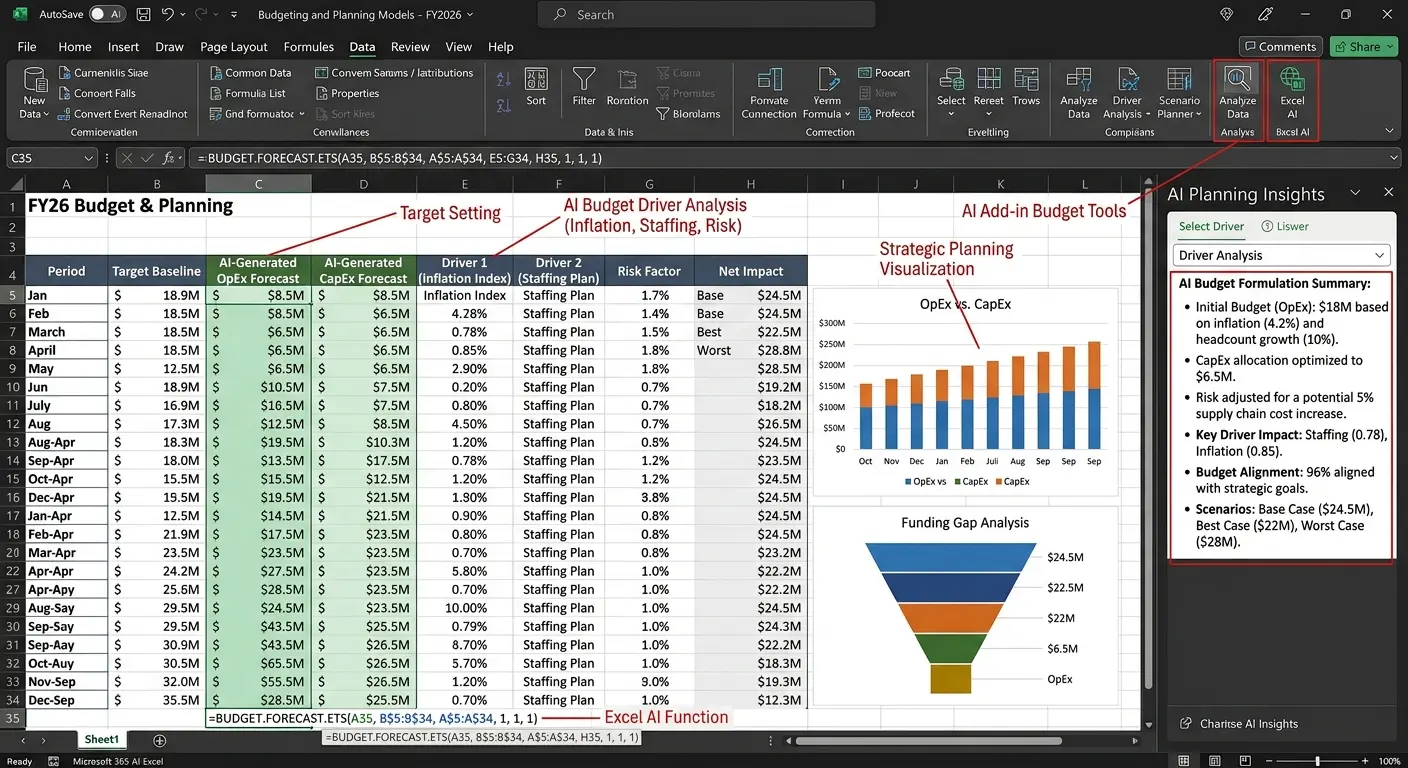
Read More: Use Cases of AI-Powered Excel Add-ins
Cash Flow Models
Cash flow models are used for tracking and forecasting the money coming in and going out of the business over a specific time duration.
They use information such as sales revenue, operating expenses, loan repayments, and other financial transactions to estimate future cash availability.
Key components of a cash flow model that AI can contribute to:
-
Assumption blocks: Store data related to when customers are expected to pay, when the business should pay (to suppliers), tax amount, and expected business growth.
-
Validation check: Verify whether cash flow calculations are accurate to identify errors in the model.
-
Receipt and payment schedule: Track incoming payments from customers and outgoing payments for suppliers, employee salaries, and loans.
-
Linked Excel data: Ensure each calculation is properly linked so changes in one place automatically reflect in other places in the entire spreadsheet.
The add-in can help prepare projections that allow businesses to anticipate cash shortages, plan upcoming expenses, and manage their available funds more effectively.
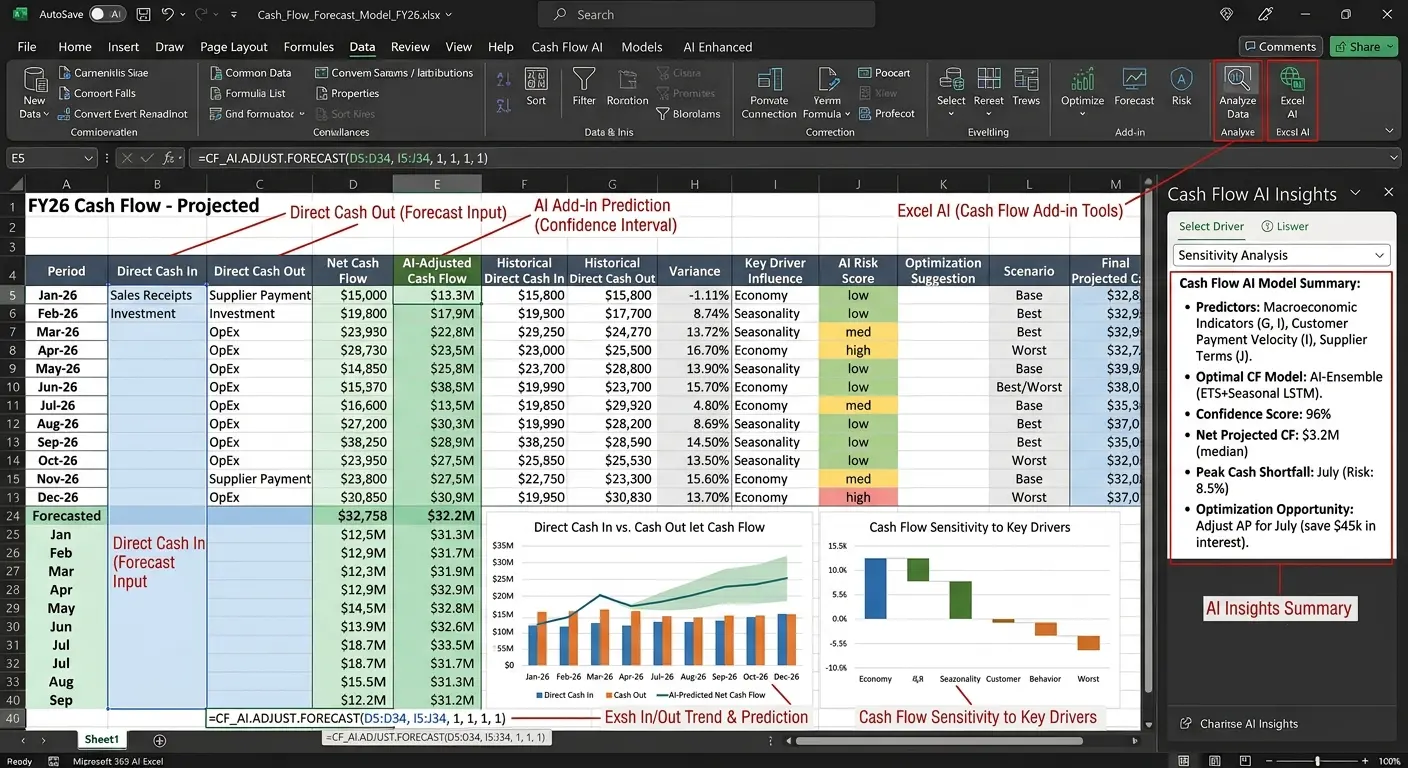
Three-Statement Financial Models
A three-statement financial model connects a company's three main financial statements: the Income Statement, Balance Sheet, and Cash Flow Statement. It helps businesses understand their financial position, estimate future performance, and evaluate how changes in revenue, expenses, assets, or debt affect the overall business.
The three statements serve different purposes:
-
Income Statement: Shows the company's revenue, expenses, and profit or loss over a specific period.
-
Balance Sheet: Shows what the company owns (assets), what it owes (liabilities), and the remaining value for its owners (equity) at a particular point in time.
-
Cash Flow Statement: Tracks the cash coming into and going out of the business through operating, investing, and financing activities.
AI-powered Excel add-ins can help create this model by:
-
Generating formulas
-
Organizing historical financial data
-
Linking calculations across the three statements
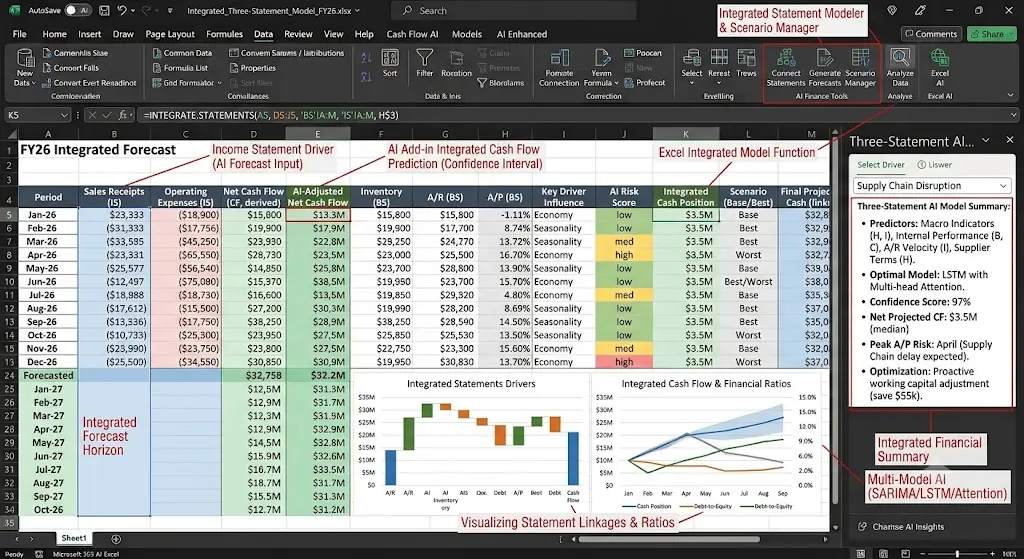
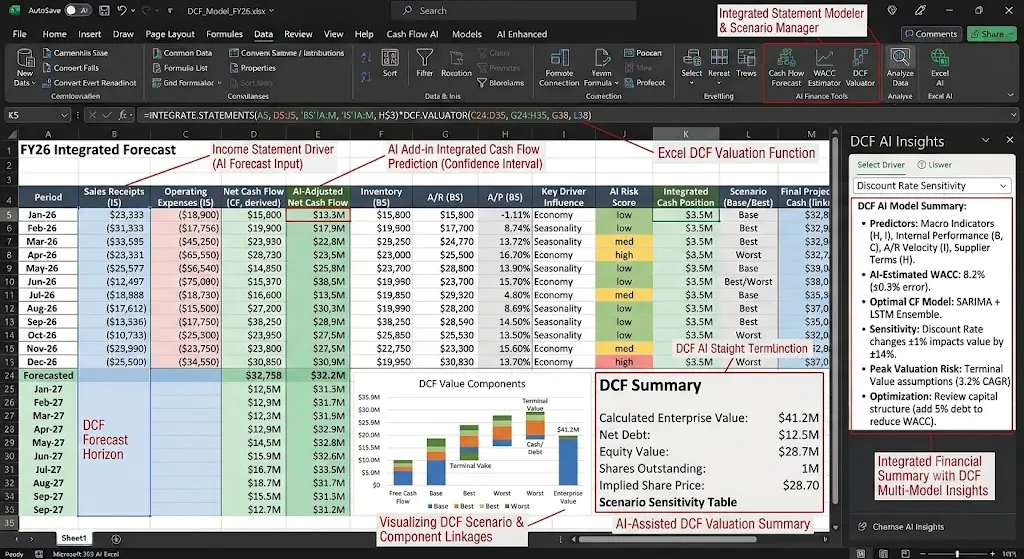
Discounted Cash Flow (DCF) Models
A Discounted Cash Flow (DCF) model estimates the current value of a business by calculating how much its expected future cash flows are worth today.
It is based on the idea that money received in the future is generally worth less than the same amount of money available today.
AI-powered Excel add-ins can help build DCF models by organizing historical financial data, generating formulas, projecting future cash flows, and calculating their present value using an estimated discount rate.
The model typically includes:
-
Future Cash Flow Projections: Estimates the cash the business is expected to generate over the next few years.
-
Discount Rate: Represents the required return and risk associated with the future cash flows.
-
Present Value Calculation: Converts future cash flow estimates into their equivalent value today.
-
Terminal Value: Estimates the value of cash flows beyond the detailed forecast period.
-
Business Valuation: Combines the present values of projected cash flows and terminal value to estimate the business's value.
Simplify Business Documentation with Word add-ins development
Valuation Models
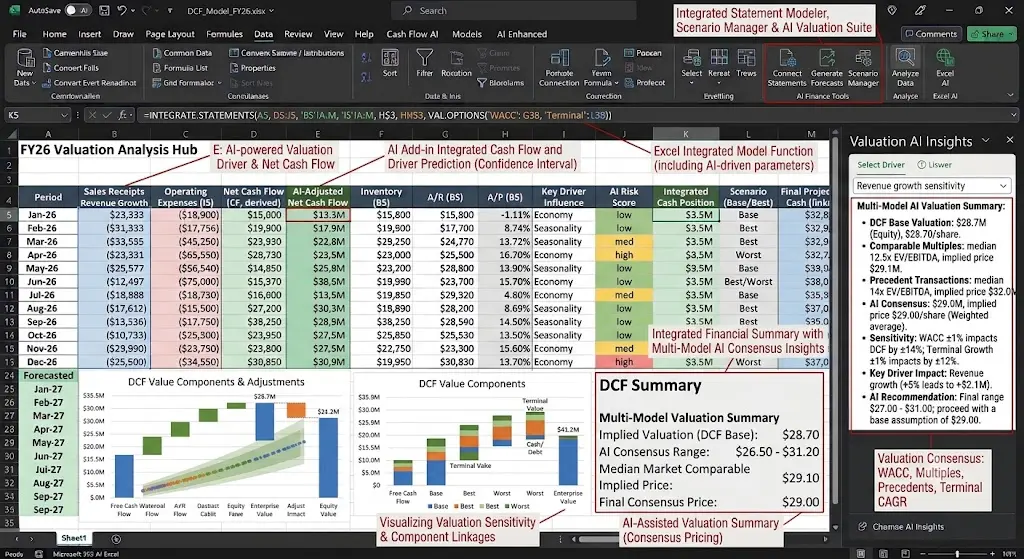
A valuation model estimates the financial worth of a company, business, or investment using its financial performance, assets, and market data. Businesses and investors use these models to assess whether a company is fairly valued, compare it with similar companies, or make decisions about buying, selling, or investing in a business.
Valuation models commonly use methods such as:
-
Discounted Cash Flow (DCF): Estimates business value based on projected future cash flow.
-
Comparable Company Analysis: Estimates value by comparing a company with similar businesses using metrics such as price-to-earnings (P/E) ratios.
-
Asset-Based Valuation: Estimates value based on the company's assets and liabilities.
AI-powered Excel add-ins can help build valuation models by organizing financial data, generating formulas, calculating financial ratios, and comparing a company's performance with similar businesses.
Scenario and Sensitivity Analysis Models
Scenario and sensitivity analysis models show how changes in financial assumptions can affect future performance. These models allow financial analysts to evaluate different possibilities, such as changes in sales revenue, operating costs, interest rates, or market conditions, before making business decisions.
Scenario Analysis:
Compares different business situations, such as best-case, expected, and worst-case scenarios. For example, a business can compare its expected profit if sales increase by 15%, remain unchanged, or decrease by 10%.
Sensitivity Analysis:
Examine how changing one specific variable affects a financial result. For example, a business can check how a 5% increase in operating costs affects its net profit while keeping other assumptions unchanged.
AI-powered Excel add-ins can automate calculations, update projections when assumptions change, and help compare different financial outcomes. This allows businesses to identify potential risks and make better-informed financial decisions.
Profitability and Break-Even Models
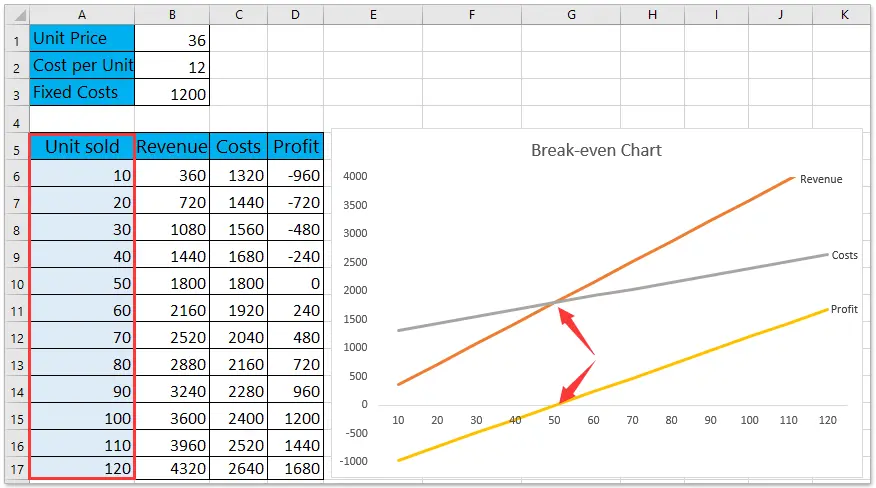
Profitability and break-even models help businesses understand how much profit they earn and how much they need to sell to cover their costs.
A profitability model analyzes revenue, expenses, and profit margins to identify which products, services, or business activities generate the most profit.
A break-even model calculates the sales volume or revenue at which total income equals total costs, meaning the business makes neither a profit nor a loss.
How AI-powered Excel add-ins help:
-
Calculate profit margins and total profit
-
Compare profitability across products or departments
-
Determine the sales volume needed to cover costs
-
Analyze how changes in prices, expenses, or sales affect profits
-
Automate calculations and update results when input values change
Investment Analysis Models
An investment analysis model evaluates investment opportunities by estimating potential returns, costs, and risks. It uses financial data, expected cash flows, investment costs, and projected returns to help determine whether an investment is likely to meet financial goals.
AI-powered Excel add-ins can help build these models by organizing investment data, generating formulas, calculating expected returns, and comparing different investment options.
These models help users make more informed investment decisions. However, AI-generated results depend on the accuracy of the input data and assumptions, and projected returns are not guaranteed.
Why settle for basic slides? Try custom PowerPoint add-ins development and present with confidence.
Best Practices for Building Financial Models with AI-Powered Excel Add-ins
Building a financial model with AI is easier when you follow the right approach. Here are some best practices to help you create accurate, reliable, and well-structured models.
-
Start with accurate and well-structured financial data because AI relies on the quality of data to generate output.
-
Clearly define assumptions and objectives, which helps model to know what needs to achieve.
-
Verify formulas and calculations before relying on results because AI-generated formulas may contain errors or use incorrect assumptions.
-
To prepare businesses for different financial situations, test multiple scenarios and validate outputs against historical performance.
-
Models contain sensitive information, so use secure add-ins with appropriate data access permissions.
Build Smarter Financial Models with AI-Powered Excel Add-ins
AI-powered Excel add-ins are making financial modeling more efficient by helping businesses automate calculations, analyze historical data, generate formulas, and forecast future financial performance. From budgeting and cash flow forecasting to business valuation and investment analysis, these tools can simplify complex spreadsheet tasks and support better financial planning.
However, reliable financial models still depend on accurate data, clearly defined assumptions, secure tools, and proper validation of formulas and results. By combining AI capabilities with human oversight, businesses can build financial models that save time, improve analysis, and support informed decision-making.
Working with an experienced Excel add-in development company can also help businesses create customized AI-powered solutions that align with their financial workflows and specific business requirements.
FAQs
1. What are the most common types of financial models in Excel?
The most common types of financial models in Excel include financial forecasting, budgeting and planning, cash flow, three-statement, discounted cash flow (DCF), valuation, scenario and sensitivity analysis, profitability and break-even, and investment analysis models.
2. How do AI-powered Excel add-ins help with financial modeling?
AI-powered Excel add-ins simplify financial modeling by generating formulas from plain-English prompts, organizing historical financial data, automating calculations, and forecasting revenue, expenses, and cash flows. They can also help analyze financial trends, compare different scenarios, identify data inconsistencies, and update linked calculations when assumptions change.
3. Can AI create financial models automatically in Excel?
Yes, AI can help create financial models automatically in Excel. Users can enter plain-English prompts describing their requirements, and the AI can generate formulas, organize financial data, automate calculations, and build projections for revenue, expenses, cash flow, and profitability.
4. Are AI-generated financial formulas always accurate?
No, AI-generated financial formulas are not always accurate. AI-powered Excel add-ins can generate incorrect formulas, use unsuitable cell references, or misunderstand financial assumptions. These errors can lead to inaccurate forecasts, profit calculations, or cash flow projections.
5. Can businesses build custom AI-powered Excel add-ins for financial analysis?
Yes, businesses can build custom AI-powered Excel add-ins for financial analysis based on their specific requirements. These add-ins can automate financial calculations, generate formulas from plain-English prompts, analyze historical data, forecast revenue and expenses, and create customized financial reports.

Kapil Panchal
A passionate Technical writer and an SEO freak working as a Content Development Manager at iFour Technolab, USA. With extensive experience in IT, Services, and Product sectors, I relish writing about Azure Cloud, Data Analytics, AI, & Workflow Automation and love sharing exceptional insights on various platforms. I believe in constant learning and am passionate about being better every day.


 Use Cases of AI-Powered Excel Add-ins
October 21, 2026
 How Office Add-Ins Fit into Core Healthcare Applications
October 16, 2026
 Best AI & Automation Excel Add-ins Worth Using In Business
October 13, 2026
 Benefits of Using Microsoft Graph with Outlook Add-ins
October 08, 2026





 Say Hello
 Inquire